如何选择合适的torch版本#
我们首先明确一个结论:安装支持 CUDA 的 PyTorch,前提条件是拥有 NVIDIA GPU,并且显卡驱动支持的 CUDA 版本高于或等于编译 PyTorch whl 包时所使用的 CUDA Toolkit 版本。这一点从官方文档中可以得到印证:
Additionally, to check if your GPU driver and CUDA is enabled and accessible by PyTorch, run the following commands to return whether or not the CUDA driver is enabled:
CUDA API分为Runtime API和CUDA Driver API(详见cuda-platform-driver-and-runtime ↗),其中
The CUDA runtime API is implemented on top of a lower-level API called the CUDA driver API, which is an API exposed by the NVIDIA Driver.
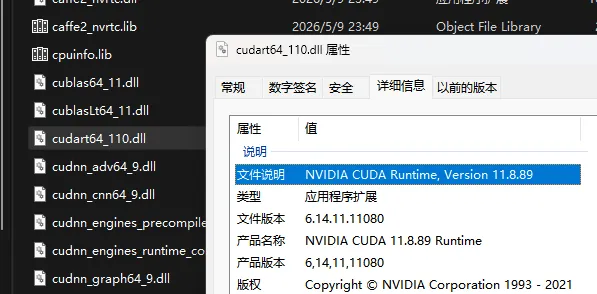
PyTorch 的 GPU 加速依赖于 cuDNN,cuDNN 依赖 CUDA Toolkit,而 CUDA Toolkit 则建立在 Runtime API 之上。关键在于,PyTorch 在编译发布时就已经内建包含了对应版本的 CUDA Runtime API 动态库。例如,我们使用如下命令安装:
pip3 install torch torchvision --index-url https://download.pytorch.org/whl/cu126安装完成后,在 Lib\site-packages\torch\lib 目录下可以看到相关自带依赖:
因此,只要安装了NVIDIA Driver,并且其CUDA版本(可以通过nvidia-smi得到)大于torch编译时所使用的cuda版本,即可使用GPU加速的torch。实际上我们无需安装CUDA Toolkit。
如何快速的安装torch#
官方提供的标准安装指令如下(以 CUDA 12.6 版本为例):
pip3 install torch torchvision --index-url https://download.pytorch.org/whl/cu126可以使用镜像源加速(NJU Mirror ↗)
pip3 install torch torchvision --index-url https://mirrors.nju.edu.cn/pytorch/whl/cu126注意: 必须使用专用的 PyTorch whl 镜像源地址,通常的 pip 全局镜像源(如清华源 pypi 目录、阿里源等)无法直接加速带有
--index-url指定的特定 CUDA 版本包。